Case Study:Showa Create Cebu, Inc.

Showa Create Cebu, Inc.
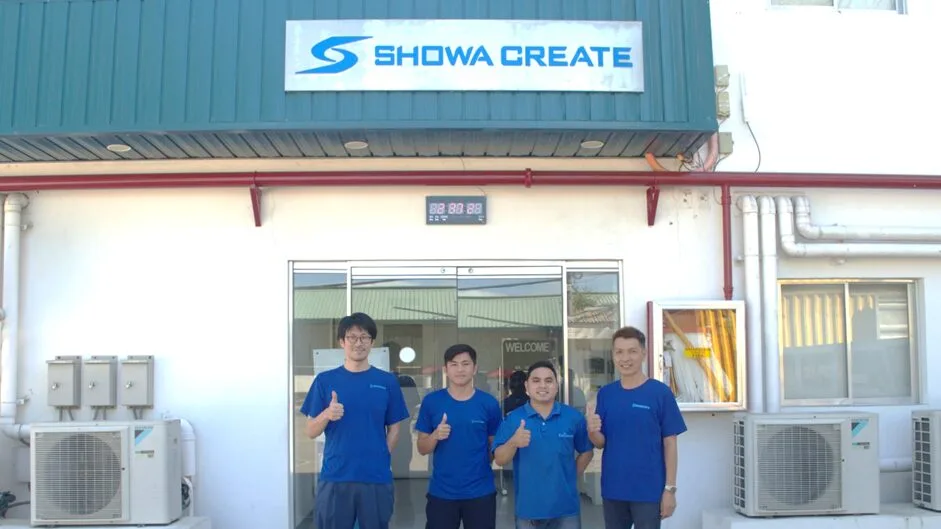
Digitized the large amount of paper forms required for quality control of pressed component parts. High expectations to promote DX to the headquarters
Kaizen effect
-
The records required for on-site management and operations were collected using a large number of paper forms.
-
They significantly reduced paper by using digital forms.
-
They wanted to save the time and effort required for printing, storing, calculating, etc., and reduce the errors that occur from data input.
-
Data input in forms has become smoother, and the service has also led to fewer errors and misreads.
-
They took a lot of time and experienced the burden of searching and checking past records, which led them to not utilize the data.
-
They were able to find past records quickly, complete the calculation fast, and accelerate the use of data.
-

Showa Create Cebu, Inc. General Manager Muneyuki Yoshio
-

Showa Create Cebu, Inc. Assistant General Manager Susumu Ueno
-

Showa Create Cebu, Inc. IT/Production Documentation Officer Jeff Ralph Sisles
-

Showa Create Cebu, Inc. Process Engineer Joshua Jesson Aninon
Key points of this case study
By receiving proper training on RAKU-PAD (OEM version of i-Reporter), Showa Create Cebu, Inc. learned how to use this service effectively and started to gain ideas on how to improve work productivity. Transferring the existing paper forms (excluding those created by the deployment partner) to RAKU-PAD is now done internally, and the usage and deployment of this service are in progress.
Showa Create Cebu, Inc.
Showa Create Cebu, Inc. manufactures various pressed component parts that are incorporated into products, such as lighting fixtures, automobile parts, and architectural hardware. For more than 10 years, Showa Create Cebu, Inc. has been using paper forms for their tasks. But in recent years, they recognized many issues coming from paper and have decided to deploy “mcframe RAKU-PAD” (hereinafter RAKU-PAD) from Business Engineering Corporation (B-EN-G). They have spread this service to the manufacturing sites, quality control team, and other locations to improve work efficiency and become paperless.
Showa Create Cebu, Inc.
https://showa-ph.studio.site/
Established in: October 2013
Capital: 100 million JPY
Number of employees: 76 (including part-timers)
Business activities: Manufacturing of pressed component parts
Showa Create Cebu, Inc. is a manufacturer of pressed component parts, located in Cebu, Philippines, and was established as a group company of Showa Spring Co.Ltd.
The company manufactures pressed component parts incorporated into many products (metal press processing, tempering, welding, assembly, etc.). Their main strength is the processing of leaf springs.
After getting proper training, digital forms have become the norm.With working digitally, forms have started to get reviewed.
Case study from a Japanese company in the Philippines, which was established more than ten years ago.
The large amount of paper forms was the main issue.
Showa Spring Co.Ltd (hereinafter Showa Spring) is a manufacturing company that mainly manufactures pressed component parts. Their headquarters is located in Tondabayashi city, Osaka prefecture. Showa Spring’s group company, established in the Philippines in 2013, is Showa Create Cebu (hereinafter company). Mr. Yoshio, the company’s general manager, explains, “We originally started as an assembly line, but now we handle everything from creating parts, including metal press processing and tempering.”
Paper forms were always used at the company as part of the manufacturing process, which was done the same way in Japan headquarters. They translated the forms provided by Showa Spring into English and utilized them.
Mr. Yoshio reflected on the past, explaining, “We use so many forms. Just by manufacturing, there are over 20 different types of forms. In particular, we fill out forms related to manufacturing and quality control every day. The costs coming from printing and managing were extremely expensive.”
Paper forms can be risky when it comes to work. For example, they can get lost, filled out incorrectly, or tricky to read. It took a lot of effort and time to gather and calculate data using the stored forms. They also checked the past data by starting with finding those paper forms. Basically, they were doing these tasks as a normal routine. Back then, they didn’t recognize that the way they worked using paper was an issue.
What got them to recognize this issue was learning how N-PAX Cebu Corporation (hereinafter N-PAX), a Japanese IT company based in Cebu, was working digitally. In 2023, the company conducted interviews as part of its proposal activities for various IT-related services. Taiki Okubo from N-PAX reflected back to the company’s work experience at that time, explaining, “During the meeting, we realized that Showa Create Cebu had issues with paper forms, so we decided to recommend mcframe RAKU-PAD.”
Through N-PAX’s meetings and proposals, Mr. Yoshio recognized the big issue coming from paper forms. They were already considering using iPads for work. However, after learning more about RAKU-PAD, it was felt that this service would help them improve their productivity.
Digital forms have been deployed. More teams started to work digitally.
RAKU-PAD was deployed in the company. At first, the manufacturing team started using this service. At first, N-PAX digitized several forms on behalf of the company. Before using this service, employees and IT members at the manufacturing sites who will soon use this system participated in the training program held by N-PAX.
One of the current users, Joshua Jesson Aninon, who is a Process Engineer at the company, felt the following after using RAKU-PAD.
“At first, we didn’t know how we could use RAKU-PAD in our work process. However, the training allowed me to realize that this service can be used for data storage, utilization, traceability, etc.”
RAKU-PAD has started to spread out to other teams, such as the maintenance team, quality control team, and more. Jeff Ralph Sisles, the company’s IT/Production Documentation Officer, is currently in charge of digitizing forms (excluding those that were helped by N-PAX). He explained as follows.
“The training definitely helped us create forms easily. It’s very convenient as we can add drop-downs or radio buttons to make a selection list as a fixed option. Also, if we find any duplicates or sections that are not necessary, we double-check with the members about what we should include in the form.”
As of June 2024, approximately 40 types of forms have already been transferred to RAKU-PAD. Mr. Yoshio, who has seen employees mastering RAKU-PAD and expanding its use, explained how this service has improved work productivity as follows.
With RAKU-PAD, the data input tasks have become much easier. It’s rare to make mistakes. Dates, departments, and other data are usually entered correctly. In addition, we can easily check and collect past data. I also remembered how we got forms in the past. We first needed to go to our main office to pick up the standard operating procedures (SOPs) before starting work. However, experienced workers sometimes relied on their experience and did not refer to the SOPs. RAKU-PAD’s library management feature allowed us to open the SOPs without going to the office, so this service helped us save time. Overall, RAKU-PAD gave us a positive impact on our work productivity. Another good point about this service is that the form layout can be kept the same as our old paper form. Most on-site employees tend to not like making changes to their work style. However, this change was easy for them to accept, which allowed the company to make RAKU-PAD the standard operation flow. In the end, this service allowed us to recognize that we need to make changes to achieve business growth. Now, I feel that the company is willing to try using more services and see if they can improve work productivity, just like RAKU-PAD.
Digital transformation is the key to delegate management.
Currently promoting the headquarters to change the work style to digital.
Mr. Yoshio has been the only Japanese at the company for over 10 years, but recently, Mr. Ueno joined the company as the Assistant General Manager. With the possibility of him being the next manager in the future, Mr. Yoshio felt that digital transformation was the key to delegate management.
“I realized that it is important for me as an administrator to prepare the tools and services like RAKU-PAD because I felt that using them is the best way to hand over my tasks to the next manager. For the first step, we are planning to transfer all forms to RAKU-PAD.”
The use of RAKU-PAD is expanding at the company, and Mr. Yoshio is thinking of constantly evaluating work productivity to promote digital transformation to the headquarters.
“Showa Spring does not yet have an on-site task improvement tool like RAKU-PAD, but it seems that many are interested in doing this digitally. Therefore, if we can provide data like cost reductions, shorter working hours, and increased work efficiency to the headquarters, they might think of starting the digital transformation to improve work productivity, just like we did with RAKU-PAD. We hope the success in the Philippines can be shared with Japan very soon.”
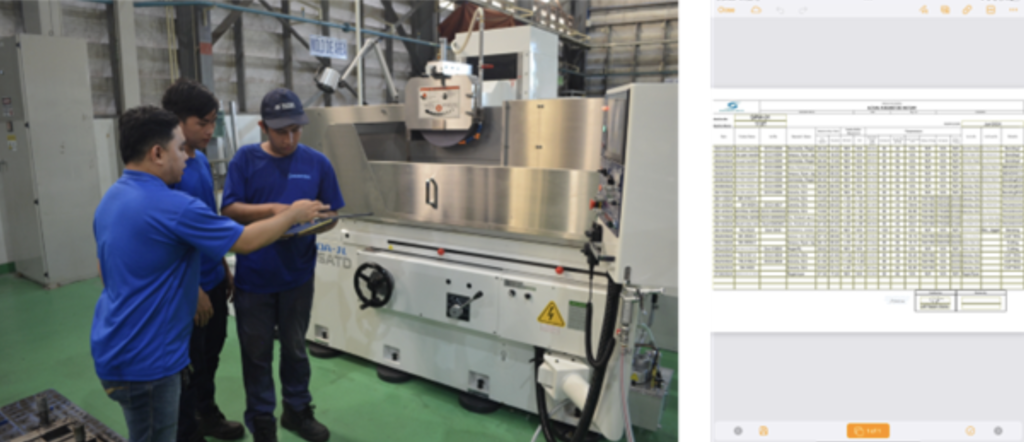
Image of the equipment used for manufacturing (left) and digital form (right)
About N-PAX Cebu Corporation
N-PAX Cebu Corporation (hereinafter N-PAX) supported the deployment of i-Reporter to Showa Create Cebu. N-PAX provides IT support, from checking the requirements in the customer’s operation procedures to setting up, providing training, and maintaining the services.
We got an opportunity to talk with N-PAX about their business activities.
N-PAX’s mission is to “provide high-quality IT services and innovative software products for its customers,” and they are currently meeting their customers’ needs by providing a wide range of IT solutions.
N-PAX has more than 20 years of experience in the IT field since its establishment in the Philippines. N-PAX not only proposes and supports the deployment of RAKU-PAD, but also provides and develops its own packages, such as HR Payroll and Attendance System (HRIS) and Integrated Enterprise Resource Planning System (ERP). In addition, N-PAX has a strong record of system development in other countries, such as Japan, the United States, Singapore, Malaysia, China, and the Middle East.
Recently, many Japanese companies in the Philippines want to become paperless, and N-PAX has been receiving many inquiries about RAKU-PAD.
They provide training in Japanese and on-site support from Filipino developers.
They provide all-in-one support, such as analyzing the current task procedures, organizing and developing forms, deploying the service, and supporting the onboarding. Also, they help customers transform their work style to digital, like promoting IT services for data visualization and analysis.
They have received high reviews from many customers (mostly from the manufacturing industry) for their consulting service related to the DX, stable service deployment through their highly managed schedule, and operational support service.
NPAX: Global IT Solutions and Service Provider (n-pax.com)
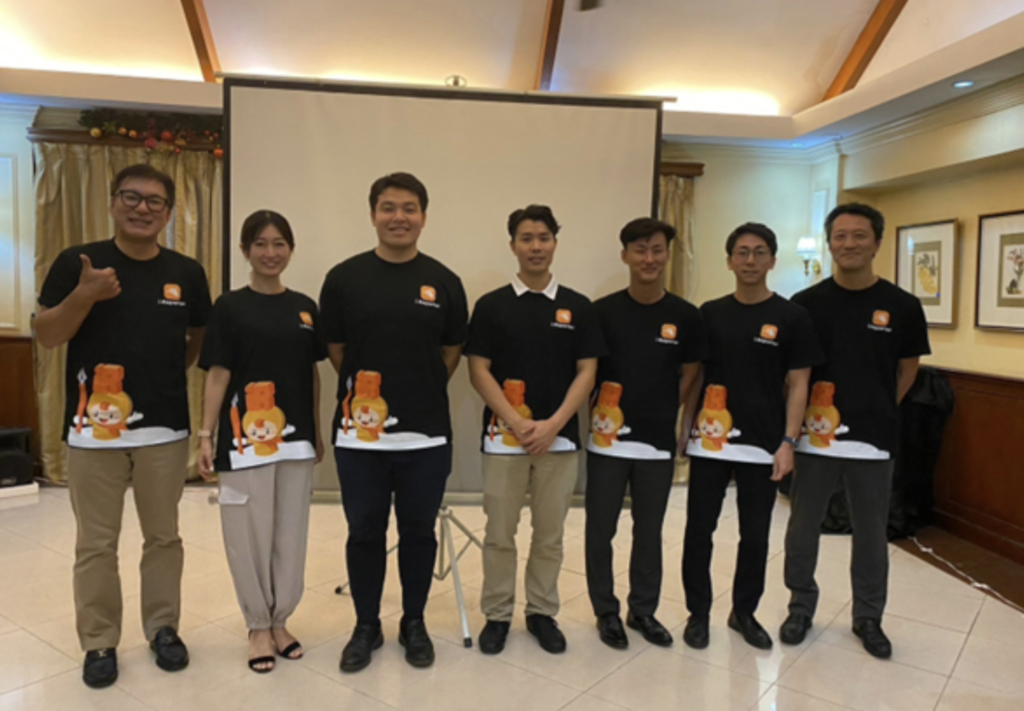
Picture of the Real Seminar for Japanese Companies in the Philippines hosted by N-PAX in November 2023
(From the left)
N-PAX President/CEO Takahiro Toda
CIMTOPS Sayaka Oide
N-PAX Taiki Okubo
CIMTOPS Koji Yokoyama
N-PAX Keisuke Ito
N-PAX Naoki Maki
B-EN-G Singapore, Managing Director Motoshi Yamashita
*This case study is from June 2024.
*mcframe RAKU-PAD Recording is an OEM version of “i-Reporter” developed by CIMTOPS.
*Titles, numbers, proper nouns, etc., explained in this case study are those as of June 2024.
*Company names, service names, etc., explained in this case study are registered trademarks or trademarks of each company.
*Please refrain from contacting the companies listed in this case study.
Company Profile
Showa Create Cebu, Inc.
- Established:
- October 2013
- Business Description:
-
Showa Create Cebu, Inc. is a manufacturer of pressed component parts, located in Cebu, Philippines, and was established as a group company of Showa Spring Co.Ltd.
The company manufactures pressed component parts incorporated into many products (metal press processing, tempering, welding, assembly, etc.). Their main strength is the processing of leaf springs.
-
-

- Other manufacturing industries with 300-1,000 employees
・Measurement and recording of 20 locations can be done with the push of a button
・Thousands of paper documents can be digitized and centrally managed
- Significant reduction in inspection and recording time
・By adding ConMas IoT, data entry time was reduced from 5 minutes to 1 second (per entry)
The system is highly complete and the level of support, including the manual, is extremely high.
There are manuals for everything, and many things can be done in-house. -
-
-

- Automobiles and Transportation Equipment 100-300 people
- Since data is entered using a tablet rather than paper, you can basically record data simply by tapping.
- Storage has become more convenient and the daily reports I need can now be viewed immediately.
・It was great that we were able to digitize the forms we had been using up until now with the same look and feel.
- The operation was simple and there was no confusion for the person entering the data.
· It is a very good improvement that we can now centrally manage various records kept by multiple departments. -
-
-

- Iron and metal: 20-50 people
Originally from Excel. Endless possibilities for use.
First, create a template in Excel. Add attributes to the input cells.
Once uploaded to the server, you can set it up using the dedicated software. Once that's done, test it and if there are no problems, publish it.
So, there is no need to program anything up to this point.
The more items you have to enter, the more difficult it becomes to set up, but once you get used to it, it's no problem at all.
Some Excel functions can be used, but not all.
Depending on the settings, the possibilities for use are endless and it is a very easy-to-use app. -
-
-

- Food with 300-1,000 employees
・It is easier to read than handwritten records, reducing the burden on administrators to check records.
- With paper, two steps were required - recording, then checking against a standard and making a decision - but with paper, the decision can be left to a formula.
- Early detection of deviations reduces losses and leads to more stable quality.
-It's also great that the information sent to the server can be checked remotely in real time.
- Photos can be taken and added to the record on the spot, and a timestamp can be automatically added, lowering the hurdle for taking records that can serve as objective evidence.
▼Name of digitized field report
Foreign object detector operation confirmation record
Health check etc. -
-
-
- Cars and bicycles Over 1,000 people
i-Reporter is easy to use in the field
- Approval route settings are simple and easy to use
⇒You can set it up to a certain extent by feel, without having to read the instruction manual carefully ⇒It is less dependent on the individual
・Work on site becomes easier (voice from the field)
⇒You can take photos of the actual item and report any abnormalities on the spot.
It has been extremely helpful in accumulating and managing evidence required for on-site work.
By introducing i-Reporter, we were able to standardize reports, make management easier, and simplify approval requests and approval procedures, as well as the accumulation and recall/linking of information, reducing work time by approximately 50%. -
-
-
- Other manufacturing industries 100-300 people
The fact that you can use Excel functions such as if statements makes it easy for Excel users to adopt, and I also think the import function is easy to use; you first create the format in Excel, then write the functions in Excel and then just import the data.
We feel that it is extremely beneficial to be able to create reports for process management and product management and link them to Motionboard to perform BI analysis. -
-
-

- General machinery: Over 1,000 people
Previously, factory quality check sheets were handwritten on paper, but now we can input data onto an iPad, register the data in a database, and electronically approve the documents, allowing for paperless storage.
Information for each product can also be imported from the higher-level system and reflected on the checklist on the iPad.
There are comprehensive manuals and support available, so I think you can achieve digitization if you have a certain level of skill.
・Processing process
Assembly process
・Operation process
・Shipping process
・Create daily reports for each process
We are introducing it into our business. -
-
-
- General machinery: Over 1,000 people
The operation feels the same as a smartphone app, so you can use it without any hesitation.
Regarding the conventional in-factory checklist,
The usual process was to fill out paper on site → collect it → approve it with a stamp → collect it → file and store it at the quality control center → scan it and save it as a PDF when the storage period expired, and then dispose of it, but now all of these processes can be done paperlessly.
It is now possible to view files from the PC on your desk without having to go and search for them.
In addition, data compilation and analysis previously required the input of paper checklist information into Excel each time, but now it is possible to extract the information from a database. -
-
-
- Software/SI: 20-50 people
・Easy to use as a native app. The UI is easy to understand.
・Can be used offline.
- You can digitize the Excel forms you have been using by simply importing them into the design tool and making a few edits.
- Label function makes it easy to classify.
-Easy to introduce as the first step towards going paperless.
- Printing and stamping work is eliminated, reducing costs.
Prevents loss of documents and mistakes when filling them out. -
-
-
- Electrical and Electronic Equipment: Over 1,000 people
By digitizing documents such as inspection sheets and progress charts, we were able to achieve a paperless system. In addition, because the documents can be created on an Excel base, there was little resistance from the field staff during the transition, and the digitization went smoothly.
It is used for on-site inspections, etc. It eliminates the need for paper management, leading to reduced man-hours and costs. In addition, by converting the data into digital data, it can also be used for tabulation and performance analysis. -
-
-
- Electrical and Electronic Equipment: 100-300 people
It is not only easy to digitize Excel files, but also to use the data for secondary purposes. Even if you are not familiar with systems, you can digitize paper documents with intuitive operations.
In the manufacturing process, many paper forms were attached to the product, but by digitizing them, we were able to reduce paper resources and, even with the movement of products between departments, we were able to refer to the forms from anywhere, which was good. In the future, we would like to actively promote secondary use of the acquired data.
Don't be overconfident that spending money to introduce a system will immediately bring about improvements, but rather use it in an innovative way to maximize the benefits. -
-
-
- Automobiles and Transportation Equipment 100-300 people
- Using QR codes can reduce the hassle of inputting information
・Report formats can be created from Excel files
・It was introduced with the aim of reducing the time it takes to input and compile information written on paper at the work site.
・We have not yet been able to use it to tally data, but we no longer have issues with data being handwritten and illegible.
▼Name of digitized field report
Daily operation report -
-
-
- Plastic products
・It was possible to set up and operate the system without making major changes to the paper forms.
· By participating in a hands-on seminar prior to implementation, the barrier to construction was low, and we were able to get the system up and running in a short period of time.
・It is mainly used for recording production at manufacturing sites, and input from iPads was easily accepted.
・By linking data with the upper core system, it contributes greatly to reducing input errors and paper
・Production status can now be seen at a glance thanks to display on the BI tool -
-
-
- Electrical and Electronic Equipment: with 300-1,000 employees
By digitizing the checklist, we have achieved a paperless system. It also reduces the need for storage space and transportation to the storage space.
The input check function made it possible to reduce human error.
The document management function makes it possible to search smoothly when needed.
With paper-based management, the longer the storage period, the more time it took to secure storage space and search, which made it less efficient. With digitalization, there were more benefits, such as reducing storage space, reducing costs, and shortening search times. -
-
-
- General machinery: Over 1,000 people
It has become an essential tool for promoting digitalization.
・Low coding allows even newbies with no programming skills to start development right away
・Master import integration from core systems, integration with other systems, data analysis systems, etc.
- A product that frequently adds new functions and will continue to have a wider range of uses in the future
・Equipment inspection checks were previously done on paper, but by digitizing them, issues such as searchability, reducing the amount of paper storage space, and detecting abnormalities were resolved. -
-
-
- General machinery: 20-50 people
・The workflow is simple but quite usable. In our case, the workflow is just "Person in charge" ⇒ "Investigation" ⇒ "Approval", so the workflow can be easily realized by only setting the authority and email address. In addition to approval, the workflow for change requests and change notifications can also be easily set up with just the above settings.
Data sampled on a PC can be embedded into a QR code (QR codes are automatically created in Excel), and when creating design verification documents, the data can be read and broken down into multiple clusters, allowing data to be entered all at once without the need for manual input. This is proving to be a powerful tool in improving work efficiency. -
-
-
- Other manufacturing industries Over 1,000 people
He is active as a data logger advancing digital transformation on-site.
Although we are working to collect on-site information using IoT devices, there are still many tasks that can only be recorded by humans.
By preparing a unified data collection form using i-Reporter, it is possible to link to the integrated data warehouse and operate it without any hassle. Even if the number of items to be collected increases, it is only necessary to modify the form.
By using a unified form to collect on-site data, which was previously dependent on individual staff, it is now easy to respond to sudden changes in data collection needs.
This makes management much easier when collecting similar data at multiple locations. -
-
-
- Facilities (Construction/Architecture) 100-300 people
・It's very easy to create reports, and there is ample support available.
- When entering values, it is possible to set a threshold value to prevent missing entries.
・Excel forms can be easily created, and there are many ways to input numbers, text, and photos. Photos and drawings can be placed at the same time, which is helpful for making presentations to customers.
- It is very easy to use as it is possible to use the conventional Excel format as is.
- Previously, all forms were paper-based, and we had to spend extra time and effort sorting and searching through the huge amount of documents, but now it has helped us reduce expenses and improve work efficiency. -
-
-
- Plastic products 100-300人
・You can digitize data in the familiar Excel form format.
・All form data, including re-editing history, is automatically stored in the database.
・It is now possible to instantly search and tally up data that was previously impossible to tally up on paper (e.g., date, day of the week, period, person in charge, machine, product, color, etc.)
- Edit history is accurately recorded, so you can accurately check who made the changes and what they were.
・Reduced data collection time (7 hours for monthly reports, data creation only, reduced to 5 minutes) → 5分)
・As long as the data is available, data can be compiled instantly, so clients rarely have to wait. -
-
-
- Plastic products 100-300人
If you just want to tally up data, it can be done not only in a database, but also by processing CSV data in batches or macros, which can be set to be output when the report is completed and saved.
Although it was difficult to create the entire data collection process from scratch as I had no experience, the benefits of computerizing the system were enormous.
I'll never go back to handwritten reports. -
-
-
- Transportation with 300-1,000 employees
・You can digitize the data by continuing to use the Excel you are currently using.
・Excel functions and formulas can be maintained almost as they are
- You can receive email notifications based on the content you enter.
Previously, reporting work required printing out a blank Excel form, placing it in a binder, writing the form by hand on the paper at the site and taking a photo with a smartphone, then entering the clean copy into Excel once back in the office, then connecting the smartphone and pasting the photo into the Excel file. This can now be done on an iPad.
▼Name of digitized field report
Safety Patrol Check Sheet -
-
-
- Electrical and Electronic Equipment: 100-300 people
· When digitizing paper operational formats, it was possible to create Excel-based forms even without specialist knowledge.
- Data can be collected and downloaded as a CSV file, and photos can be downloaded at the same time, making it very easy to use.
-It can be used on both the iPad and a PC, so you can fill out documents on-site using the iPad, and then add details or long text later on using the PC.
(We were able to digitize in-process defects and pre-shipment inspection records from paper to data, but the concrete numerical results of the implementation will depend on how we operate from now on.) -
-
-
- Other manufacturing operations: with 300-1,000 employees
・You can input data from any device
・DX can be promoted without changing the existing document layout
-You can create your own master
- Data is saved in CSV format on a cloud server, making it possible to link with in-house systems.
- Multiple reports can be created with one template form
・Improved input rate
・Reduce input time
・The efficiency of administrative work has been improved by changing from manual input of paper to input into the in-house system, to inputting data into the system only through i-Reporter.
・Differentiation from competitors -
-
-
- Other manufacturing industries Over 1,000 people
Daily quality characteristic data and other data that was previously managed on paper has now been digitized and can be referenced at any time, which is extremely helpful in terms of quality control. template form can also be created on an Excel base, so once you get used to it, it's easy to create them.
Because trends in quality control data can be extracted all at once, we were able to immediately see what trends had preceded the current problem. -
-
-
- Facilities (Construction/Architecture) Over 1,000 people
・The control numbers were previously entered manually, which was prone to errors and was time-consuming, but by converting the control numbers into barcodes and scanning them, it became possible to enter them instantly. This prevented input errors and reduced the time required.
-Mandatory input function prevented omissions.
- The date and time can be managed more accurately thanks to the automatic input function.
- Now, documents can be submitted without having to travel to distant departments, saving a lot of time.
Problems solved and specific effects
・Prevent typos and save time
・Prevention of omissions
- Improved accuracy of date and time input -
-
-
- Electrical and Electronic Equipment: 20-50 people
When the system was first introduced, it was used to digitize checklists and other documents that had previously been used on paper at the production site, but it was discovered that i-Reporter reports could be created without worrying about the number of pages.
It is easy to flip pages, so even if the number of pages in a document increases, it can be used without any discomfort.
- With paper forms, it was necessary to use the minimum number of check items and text necessary to fit on a single page.
- Since it is also possible to use photos, etc., the system can be used as both a procedure manual and a checklist, making it easy to use the checklist even when the person in charge is not present. -
-
-
- Other manufacturing industries Over 1,000 people
- Easy form design
-Various functions to meet on-site needs
・Ease of using data
・Forms can be developed without special IT skills
・Detailed functions required for on-site work are implemented in an easy-to-use format
・Data is stored in an easy-to-process format, making it easy to link with other systems
・Paperless on-site operations
・Data aggregation problem
- Secure management of photo data
· The transition was efficient because the traditional Excel forms could be digitized as they were.
-By going paperless, we were able to collect all the data in one place. -
-
-
- General machinery: 20-50 people
- ISO9000-related Excel reports can be transferred directly to i-Reporter, making it easy to go paperless.
· Because it was in the same Excel format as before, it was quickly accepted on-site.
- Review and approval workflow settings can be set up as standard functionality.
- Easily set up email notifications for reviews, approval requests, etc.
- If you convert measurement data from another measuring device into a QR code in Excel, you can simply read it into i-Reporter and the measurement values will be entered, eliminating the need for transcription.
・The time required to input various reports has been reduced. Data can also be shared. -
-
-
- Automobiles and Transportation Equipment 100-300 people
By switching from inputting data on paper to using i-Reporter, it became possible to utilize the data, reducing the effort required for searching and increasing the scope of data utilization.
The task of transcribing data from paper has been reduced, and secondary use of the data has become possible.
In addition, by using it for lot management, it became possible to manage the progress of the lot, eliminating the trouble of having to search for the actual item.
▼Name of digitized field report
Lot control sheet -
-
-
- Construction, Minerals, Metals: Over 1,000 people
・Report design can be freely configured.
-An app is available and security measures are easy to implement as it does not require the use of a browser.
· Even though the factory does not have a network, by installing an app on a SIM-free tablet, it is now possible to exchange electronic data entered on-site with electronic information on a PC on the in-house network.
We believe that it will prove beneficial as a key tool in the movement towards achieving a paperless society.
・Paperless/printing hassle/on-site distribution hassle, etc.
▼Name of digitized field report
Pre-work checklist -
-
-
- Food with 300-1,000 employees
Since daily reports differ depending on the products manufactured in the factory, they can be created to suit each daily report, and the use of selective input and simple functions reduces the workload.
In addition, we were able to use the database to register and retrieve data, and create inventory management for work-in-progress and maintenance and inspection management in line with our operations.
The previous transcription work was converted into electronic documents, which allowed for database integration and reduced duplicate work.
At one factory, 50% of daily reports have already been digitized, making it possible to achieve things that were not possible with paper, such as inventory management of work-in-progress.
▼ Digitized on-site documents
Maintenance slips and reports
Inventory Management Daily Report
Daily attendance management report -
-
-
- General machinery: 100-300 people
This is a major first step in going paperless within the company.
- Screen design can be done in Excel, making it easy to modify the screen layout of input forms.
- Some Excel formulas can also be used, making it convenient to incorporate functional logic into the input content.
- Being able to develop it ourselves has led to improved IT literacy within the company.
・Used to manage the performance of on-site workers in factories, achieving a paperless system
・Reduce the time required to record results (reduce labor costs) and reduce recording errors
⇒ The investment costs were expected to be recovered about one year after implementation. -
-
-
- Other manufacturing industries with 300-1,000 employees
・It is created from Excel format, so you can use the Excel format you are currently using. Easy to get started.
Utilizing single and multiple selection options to select from options and setting prohibited characters improved the variation in spelling, leading to more efficient data collection.
・Gateway integration allows you to do things that are not included in the standard features (such as creating graphs from entered data and performing unsupported function calculations).
· Data such as standard values, unit prices, and machine numbers can be easily pulled from the master, expanding the range of uses, such as displaying standard values for each product and calculating losses. -
-
-
- Food with 300-1,000 employees
Reduce paper forms and system input work at manufacturing sites
・By using Python script integration, the degree of freedom has increased dramatically. Detailed validation checks and PostgreSQL references within Python are possible, so we have been able to go beyond electronic forms and reach the level of a dynamic application.
・Manufacturing instructions have been digitized. Previously, production results were written on paper and entered into the system one by one by hand, but now the data is reflected in the system from iPads, reducing labor costs and eliminating the need for paper.
▼ Digitized on-site documents
Manufacturing Instructions -
-
-
- Automobiles and Transportation Equipment 100-300 people
I decided to use this product because it does not require programming languages and allows you to create web forms even without specialized skills. The free seminar at the time of introduction was thorough, and even I, who had no prior knowledge, was able to introduce it successfully. It allows you to go paperless with checklists and daily work reports that were previously written by hand, and makes them visible in real time, and is at a price range that even small and medium-sized enterprises can afford, so I'm glad I was able to introduce it.
Data and records that could only be viewed by going to the site can now be viewed from remote locations, allowing us to take action more quickly -
-
-
- Other manufacturing industries 100-300 people
A versatile product that is easy to implement for Excel users
・A place where you can create report layouts in Excel
- Excel functions can be used as is (only some of them)
・Forms that were originally printed from Excel can now be made dataless.
- Easy to use because it is familiar
In addition to going paperless and integrating Excel, which was previously on the server, the integration with MotionBoard has made it possible to carry out real-time analysis.
▼Name of digitized field report
Product Management
Process Management
Inspection Management
Equipment Management -
-
-
- Automobiles and Transportation Equipment Over 1,000 people
ConMasGateway and API functions are excellent
What I find attractive about i-Reporter is that the information entered is digitized and can be linked to external systems.
There are some tasks that require human judgment (such as inspections) that are difficult to automate, so we would like to make full use of this technology.
The work of checking for errors and omissions, as well as the task of calculating information by comparing each piece of paper, was eliminated. → Labor costs reduced by approximately 480 hours per month
▼ Digitized on-site documents
Checklist
Quality control report -
-
-
- Beverages, tobacco, and feed: with 300-1,000 employees
Problems solved and specific effects
There were no more calculation errors.
-Until now, I had been filling out the form to apply for overtime hours by hand, but even though I was careful, I was making calculation errors.
I contacted the support website and was instructed on how to set up automatic calculations. After I started using i-Repo, the calculation errors disappeared and the checker's work time was significantly reduced.
▼Name of digitized field report
Micropipette accuracy check table
Overtime application form -
-
-
- Electrical and Electronic Equipment: 20-50 people
no-code report app development with satisfactory support
- Report designs can be created in Excel, so ideas can be shared at the requirements definition stage and adjusted designs can be implemented as is.
- Various input methods can be implemented without no-code, making report development quick.
-Complex judgments and controls can be easily achieved by combining Excel formulas and network functions.
・When I have a problem, I can contact the support website and they will even consider a solution. It has helped me many times.
▼ Digitized on-site documents
Security Inspection Questionnaire
Construction documents
Quotation -
The above reviews are quoted from ITreview.(https://www.itreview.jp/products/i-reporter/reviews)
※ITreview is a real-name, company-verified review platform featuring authentic feedback from professionals on the front lines.